Friday, August 31, 2012

6 Brilliant Tips for Maintaining Website Traffic

Use my 6 brilliant tips for maintaining traffic. Better still they are free and simple to implement.

  1. Keep the content relevant to your target audience and current visitors. For instance, don't write about your dog if your website is on learning languages.
  2. Develop a tone that is in tune with your audience - Don't bombard your reader with technical language they have no knowledge of.
  3. Don't substitute quantity for quality. Indeed, aim for high quality content above all.
  4. Offer your audience something different. Write about something novel or something that no one else knows. Or take an original or alternative viewpoint on an issue. Or offer an alternative way of doing things, or using your product in a novel way. Especially grasp this if they are relevant to your niche.
  5. Be concise. Don't waffle on unnecessarily or bombard your reader with things of no interest to them. If you have an exciting point to make or an attractive offer, don't cloud it with irrelevant information. Don't have lengthy introductions. Get into the substance straight away. Make your content digestible - Using bullet points are useful for this.
  6. Have a variety of media and content on your website to keep users entertained - Include a crazy or attention-grabbing photo, interviews with renowned, well-known, or respected people


Search Engine Usage Based On Browsers Used

According to a study that was carried out by ad network Chitika, people who use Internet Explorer tend not to use Google and instead use Yahoo and Bing. The ad network analyzed hundreds of millions of ad impressions earlier this month (within The US and Canada).

Chitika was seeking to conclude which search engines were used on each of the different browsers.

From this study they found out that Google generated 74.7% of search traffic across all of the five browsers which were examined. Yahoo came in second with 12.3% and Bing was placed third with a 9.74% share of search traffic across all five browsers. In comparison to the most recent comScore data, which was carried out in July 2012, Google was shown as having 66.8 percent, Bing with 15.7 percent and Yahoo with 13 percent of US search traffic.

Among the major browsers out there, such as Google chrome and Firefox, Google had the greatest share of search traffic on chrome.Opera is the only one higher at 95.3 percent but Operas share in the PC market is insignificant compared to Google Chrome and others. The browser in which Google had the lowest amount of search traffic, according to the study, was internet explorer, with 53.1%. The graph below can help you to see more detail:

Search-Traffic-Comparison

Consequently Internet Explorer is also the browser where Yahoo and Bing’s shares are the greatest out of all five browsers, with Yahoo having 19.1 percent and Yahoo having a share of 22.5 percent. However, Bing is the default search engine when you are using Internet Explorer. Microsoft’s Internet Explorer has the biggest share of the US PC browser market at either 41 percent or 54 percent, totally depending on which numbers you believe to be true. Although, on a worldwide basis, several sources out there have recently proclaimed that Google Chrome is in fact the browser market leader. You can see this below:

Global-Browser-Market-Share

Personally I think that Google Chrome is more likely to be the browser market leader, simply due to its reliability and the speed in which it loads web pages.

Search Engine Usage with in the UK

2012 has been a huge year so far, especially when it comes to the growth of searches within the UK. Every month when the number of UK Internet visits going to search engines are looked at,this year has month after month outperformed the corresponding month from 2011. On average searches within the UK are rising by 93 million per month compared to the corresponding months from last year. Overall this equates to an average year-on-year growth of 4.3% in visits.

Last month almost 91% of the searches were carried out on Google. Due to searches getting bigger and bigger within the UK market, Google is ensuring that they keep their pace and maintain its dominance within the UK market.

Search-Engine-Search-Share-July2012

 *Microsoft sites= Bing

When you look at the searches that have been carried out from January to July there have already been 15.8 billion visits to search engines within the UK alone, which by no means is a small number and that’s only half way through the year. In total, searches carried out in the UK has grown by 652 million so far in 2012. This means that there has been an extra 568 million visits to Google that wasn’t happening this time last year. This once again is showing that Google really are dominating in the UK.

Along with this not only are the searches growing, they are also changing. What I mean by this is the way UK Internet users are searching is becoming more complex with longer tailed keywords being searched on a more common bases. As you are able to see from the chart below, compared to last year the amount of searches for longer tailed keywords is growing and growing.

Search-Phrase-Length-Chart

From this graph above you can see that search trends are changing slowly however it is still an indication that people are carrying out more sophisticated, web-savvy searches, and are moving away from the simple search phrases that are one or two words long. The shorter search phrases still make up a large majority of the UK searches, with around 50% of the searches which were carried out within July 2012 containing just one or two words.

Although, you may be able to notice that year-on-year, the amount of searches which include one, two or three words is failing, not at a fast rate, but it is still falling. Whereas the amount of searches that were carried out which contain four or more words is on the rise. As the amount of searches rises within the UK, it is very likely that long-tailed-keywords will become very important within the near future.

Google Webmaster Tools Breaks Down Site Errors

The Google Webmaster Central blog announced that the Site Errors report now is a lot more detailed and useful for webmasters. Now, the errors are broken down by each category into more specific errors.

For example, if your site is not accessible to GoogleBot, Google will try to say it is because of a DNS issue or server is down or maybe a robots.txt file preventing access. Google will also display statistics for each of your site-wide crawl errors from the past 90 days. And the report will show the failure rates for any category-specific errors that it finds for your web site.
Here is an example report:


If any of the errors do not make sense, Google will let you hover your cursor over the error name and Google will provide a short summary of the error, with a link to more details on the Google Help page.

Only 9% Of Tech Blogs Implement Google Authorship Properly

A study by Conductor shows only 9% of technology blogs have fully implemented the authorship, rel=author, attribute fully on their site. That is less than 1 out of every 10 blogs.

This is somewhat shocking because (1) these are technology blogs that should know about the feature and (2) it is shown to increase the click through rate from the Google search results to the web site. A higher click through rate leads to more ad impressions, which leads to more revenue for these technology blogs.

We’ve seen reports of authorship increasing click through rate by 30% to 150% or more.


The survey found 9% have have ‘completely’ implemented rel=author by both adding the tag to their website and pointing to the author’s Google + account. An additional 3% had implemented the rel=author tag, but ultimately did not link to the author’s Google+ account.

Wednesday, August 29, 2012

The Difference In Keyword Research For SEO vs. PPC

Often when I complete a keyword research project for a client, they ask me about keywords I may not have included, or they want to know what the relative competition on the keywords looks like. This happens often enough that I thought I would remind everyone that while research for SEO and PPC can go hand in hand, they’re actually very different.

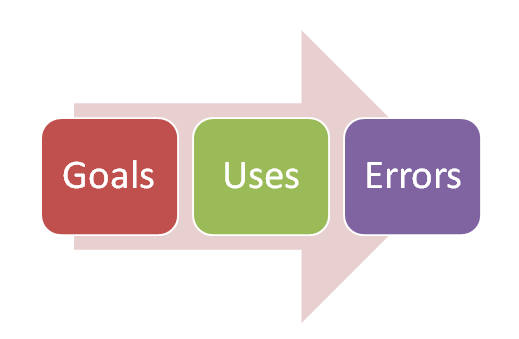
First, think about what your goals are with each medium. What are you trying to do, and what constitutes success in that area? Next, think about how the keywords will be used. Where, when, how often?

Finally, consider what your margin for error is. If you don’t get exactly the right keyword, what’s the penalty?

PPC and SEO evaluation
What… Is Your Quest?

In SEO, your goal should be to understand the keyword landscape of a topic. What keywords do people search for, and what does this tell us about their intent? What can we learn from looking at keywords in a broader context?
For PPC, your goal should be to find the keywords that you can bid on. Which keywords are going to make you the most potential money for your cost-per-click investment?

You should focus on keywords that suggest a purchase (or goal completion), that represent a category area that is profitable for you, and that you can’t easily get ranked for in organic (most of the time – there are exceptions to this).

What… Is The Air-Speed Velocity Of An Unladen Swallow?


Let’s start with PPC this time. And no, I don’t know the airspeed of a swallow, laden or unladen, so I’d be thrown into the abyss. But I do know PPC.

You’ll use the keywords in your campaigns and ad groups, in your ad copy, and on your landing page. You want to have a very tight correlation between each so that your Quality Score is high. This is pretty much it in terms of how you will use your PPC keywords.

For SEO, you’ll use these keywords as the foundation of everything that you do. Ideally, you’ll correlate your existing content on your website with them, find the gaps, and decide if you want to create additional content to fill those gaps.

You’ll identify a focus keyword or two for each page on the website, and correlate the meta tags, title, and content to match the focus keyword. You’ll also use those keywords to track and benchmark your ranking progress. I’ve created a handy image below that explains this.

Uses for SEO and PPC

Keyword uses for SEO and PPC, plus the margin for error

Understand The Margin Of Error For SEO & PPC Keywords 


In SEO, your margin for error is very large. If you use a keyword in a way that just doesn’t work, you’ll adjust it and try again. You may find yourself ranking for or getting traffic for keywords you didn’t think about. Those are a bonus, and you can just add them into your reports as needed.

You’ll also want to refresh your keyword research every now and then to make sure there aren’t new advances, technologies, products or ideas that weren’t popular when you first did your research.

Since SEO doesn’t cost a fee per keyword, you won’t (or you shouldn’t) shy away from high competition words that you may not get. It doesn’t hurt you at all to continue competing for those, and if anything, it makes it easier to qualify for many longer tail keywords.

Plus, on the user experience side, it makes your site much cleaner, because instead of having headings like “Wedding Accessories for Dog Ring Bearers”, you can stick with “Wedding Accessories” or the more specific but still high volume “Ring Bearer Pillows”. It’s important to adjust the depth of the keyword to the depth of the site, with top level pages using broader keywords and sub-categories being much more specific.

Conversely, the margin for error in PPC is small. Every mistake costs you money. Every keyword that you bid on puts you in direct monetary competition with other sites. You need to go over your keywords with a fine tooth comb, cutting out any that aren’t working, adding negatives, expanding to new opportunities, and always with one eye on the cost per click and the other on the Quality Score.

You need to make sure your keywords are tightly categorized by theme, that your ad copy is performing as well as it possibly can, and that your tight ad group/keyword strategy extends to your landing page and the way keywords are used on it. The efforts must be meticulous and calculated.

So the next time you are tempted to ask your consultant why they didn’t include competition metrics in an SEO keyword list, or why PPC categories are done by keyword rather than intent, think about the differences between the two mediums. And remember that just because data is available, it doesn’t mean it is necessarily useful in all contexts.

Google Fixing AdSense Bug: Rejected Ad Requests

A month and a half ago, I reported on a weird bug that was affecting some Google AdSense publishers where they were receiving notifications of rejected ad requests.

Since then, it was pretty quiet on the front, that was until yesterday where I guess the bug started to impact more publishers.

The WebmasterWorld thread with the original complaint saw a huge increase in complaints yesterday and I received several emails about the issue from publishers. I sent them to my previous rejected ad requests story.

The thing is, this time, Google is working on a fix. If you look at the AdSense known issues page, you will see this issue being directly addressed, where Google said they hope to have a fix out in the next few days.

We recently changed the way our system surfaces alerts related to rejected ad requests. This has resulted in some publishers seeing an alert in their AdSense accounts about needing to fix rejected ad requests, though no action is required on their part.
00
We're quickly working to fix this so that only publishers who need to take action will see the alert. We hope to have this resolved in the next couple of days, and we'll update the known issues page when the update is live. If you are concerned about this alert, please check your account after that, and if you still see the notice, follow the instructions in the Help Center to resolve the issue. Note that the vast majority (over 90%) of publishers now seeing this notification will not see it after the fix. If the instructions in the Help Center don't seem to apply to you, you are probably one of the publishers who should not be seeing this alert notification.

So hang tight, I hope this doesn't have a negative impact on your income and doesn't cause any of you additional stress.

Forum discussion at WebmasterWorld.

Pinterest Promotion and Social Media Marketing trend of 2012 – Making the most out of it

Images win in social media

Before a couple of years images rarely got any welcome for online promotion as the content in the images are not indexed by the search engines. Then came social media marketing which is human powered unlike SEO which is search engine spider powered. The images would have been blind to the search engine bots, but for the humans, “one picture is worth a thousand words!”  Remember? This fact has been proven with the social media trends of 2012. The most shared type of media in the social media sites and social networks are images. Images which are spread in the social media come in many forms such as quotes embedded in images, infographics, funny characters and much more. 

Facebook crowd loves images

There were experiments where 5 different types of media were distributed to facebook and the virility of the content was measured. Images won hands on for the reach and virility compared to the text content that was posted to the facebook wall.

Pinterest promotion demands images

Everyone now knows the interesting fact that Pinterest acquires the second place in terms of sending referral traffic to a website. Pinterest is entirely based on images and is now living up to the fact that images speak louder than words.

The entire social media crowd loves images, but do all businesses have images for promotion in social media?

It is a common misconception among marketers that social media promotion using images is successful only for websites that have portfolios, eCommerce websites that have product images and local business websites and real estate websites with pictures of locations. Social media marketing using images is not restricted to any business. If your website/ business don’t produce any image that would grab the attention of the social media, you have many other options. You can create images in the forms of:

-    Create catchy infographics with facts and statistics related to your niche
-    Quotes embedded in images along with your branding (Known as quotographics)
-    Create unique characters to represent your business and offer tips

Images are the answers to the social media marketing puzzle

Gone are the days when everyone used to wonder about the right approach of social media marketing. Start your social media marketing campaign along with Pinterest promotion today by sharing images and see your brand awareness grow. Because images and social media is the perfect combination and the trend of social media market in 2012.

Cutts and Mueller On PageRank Penalties and Selling Links

Yesterday, both Matt Cutts and John Mueller of Google answered the same question on PageRank penalties for selling links without knowing the other answered them. It has been a while since a Googler talked about selling links and the penalty associated with it, so to have two Googlers address it the same day is a special day.

Matt Cutts posted about it on his personal blog, titled why did my pagrank go down. In short, the site was selling links that passed PageRank and thus Google downgraded the PageRank of the site and trusts the links less on the site. This is nothing new, covered it several times.

John Mueller answered it also on a Google Hangout, about 40 minutes 32 seconds in on this video. I'll embed it below and you can see he calls me out a bit.


Before anyone starts yelling their heads off at me, do so on this post and not here.

Forum discussion at WebmasterWorld & Google+.

Saturday, August 25, 2012

Google Aggressively Pushing AdWords Express


A year ago, Google rebranded Google Boost to AdWords Express. It now seems like Google is cold calling AdWords advertisers to try to encourage existing advertisers to try out AdWords Express.
The early reports of the results were not too great, some even reported 400% lifts in cost per click (CPC) prices with this program. But time has gone by and things probably have settled since then.
A WebmasterWorld thread has a senior member saying Google cold called his son who has a significant AdWords spend to convince him to sign up with AdWords Express. And it worked, the son signed up.
The father feels this is against Google's terms of service to set up a new account within the same domain name. I am honestly not sure if it is.
Here is his concerns:
Just got a call from my son they have an adwords account and a pretty good spend active now. He got a call from Google to test adwords express and 100.00 free trial offer. The Google employee asked him what website he wanted the account built for so he gave them one he is using adwords for now.

I just confirmed with my son the domain Google setup for him is active in the other PPC account. So my son's company has a Google adwords account and Google sets them up an adwords express account, how is this not breaking TOS. The Google employee knows he already has an account they discussed problems he was having with terms in his active adwords account.

I am just wondering were Google is going with this and how can this be done because it breaks TOS or does it?
Forum discussion at WebmasterWorld.

Thursday, August 23, 2012

International SEO: Using XML Sitemaps hreflang = for Geotargeting?


We recently had a bit of a head-scratcher with a new e-commerce client and problems with geo-targeting the correct site to the correct region. Basically, the correct site wasn’t targeting the correct region and in most cases “.com” seemed to rank vaguely well everywhere; with the .co.uk and .com.au sites nowhere in their respective regions.
The client is a small business with fairly low average sale values that ships to just these three English speaking countries referenced. Therefore, SEO director Peter Handley who was in charge of the project, talked through a number of solutions with the client, such as one-site-select-currency-options at payment stages or keeping the multiple TLDs but really changing up the content.
In each case, however, the client had tried various solutions before and nothing seemed to work or pose a sensible solution for them when considered against the size of their site and the size of their operation. Peter then suggested to them that we try implementing rel="alternate" hreflang="country" in XML sitemaps.
This post assumes a certain level of knowledge of when and how to implement hreflang for geo-targeting multiple sites. If this is completely new to you or you need a primer then check out our original case study as I’m going to whizz through the basics before getting to the kinks you need to be aware of.

What is rel="alternate" hreflang="x"?

It’s a way of telling Google that you have pages targeted for particular regions. If you have regional pages in a variety of languages, or pages in the same language that are targeting different regions that use that language, then Google can sometimes get confused, and needs a bit of help. Using rel="alternate" hreflang="x" you tell Google what pages you want to appear to which searchers using x languages, and with regional variations in language.
To implement you have two choices: either on a page by page basis, or using an XML sitemap.
< head> code was launched first in December 2011, but didn’t appear to have widespread take up, possibly because it’s hard work to implement as you have to map the pages for each location, then determine the HTML to add to each page. In our case we judged this to be too time-consuming so as to be inefficient and opted for the XML sitemaps option instead.
XML sitemaps for hreflang were released in May 2012 as an option, and since then although there seems to be a lot of chatter and frustration in implementing this on SEO forums we couldn’t find a single successful test case. It took a lot of research, test, trial and error.
Please understand that, even though XML sitemaps is the easier way to implement this solution, there is still a lot of fiddling around. However, only one file needs to be implemented on each website with this method, so once you’ve gone to the trouble of creating the map and extrapolating that into the sitemap correctly, it actually is simple from then on.
Example code for XML Sitemap can be found here.

Results

As detailed in our original case study, this proved successful and solved the client problem. We now have an Australian site targetting .com.au and so on and so forth for the UK and U.S. markets.
It took almost exactly one week post-implementation for the regional sites to rank in the regional search engines correctly.
Hreflang isn’t about improving rankings, but ensuring regional sites are pointed correctly. Therefore the .com.au site appeared where previously the .com version had appeared in Google.com.au. In essence the correct site usurped the incorrect sites’ general place in the rankings of that engine.
Immediately, the traffic began to flow to the correct sites, reducing the paperwork and profit limiting headaches to the client, caused when customers purchased from the site foreign to their region.

Onto the Kinks...

The main problem we’ve had with this so far is that the site retains the snippet of the original site, which we hadn’t initially suspected. It seems clear from further feedback from the community that this has been talked about, but doesn’t appear to be visible in the documentation about how to set it up.
In fact, it seems that there’s been a lot of confusion and mistakes in implementing this, leading Google to deliver new canonical implementation instructions to the International Search Summit (ISS Munich).
Having seen this ourselves in a live case, we’re not sure that this is the correct path for Google to take. If for example Google rank a prominent .com site in all regions, despite this being specific to one region, and the titles and descriptions are marked-up on that regional basis to target appropriately, then why show those when they are swapping out the URL already!
Before:
localized-title-before
After:
localized-title-after
The only thing that changes is the URL!
What we wanted to see:
localised-title-for-uk-region
From conversations on one of the Google forums, a Googler suggested that because the pages were substantially similar from site to site (there was localized/localised spelling variations, but not a great deal more variation), that they didn’t warrant having their own local titles, and should instead use the same title on all these pages where they are just about the same.
This doesn’t strike me as best for the user here. Any of us who have visited the U.S., UK and Australia can attest that what might be a resonating title for an American audience might be a total crock for an Australian audience. But that is the way it is at the moment and something that needs to be heeded when implementing this solution or proposing to clients.
Ideally we would like to see this change in the future, so that targeted titles and descriptions for these specific regional SERPs match the user query, not sticking to the original.

Other Stuff

We’ve also been told by others of them having implemented this and nothing happened, so it doesn’t sound like it works perfectly in all cases just yet. A word of warning has also recently been sounded with using this in conjunction with canonicals.
Using hreflang is a new solution. In our case it was the one and only (almost) perfect solution for this client case.
We can imagine so many cases where this will be just the solution international e-commerce businesses are looking for. Particularly in Europe where we can have so many regional language variations even in one country, so this is likely to be a mainstay of international SEO targeting now and in the future.
Don’t let the lack of successful test cases put you off. Get testing and implementing.
We got some feedback from Googlers via Twitter during our implementation headache and they are interested to hear feedback from the community. Share your experience and let us know about any issues and kinks that you come across.

Facebook Likes, Increase FB Likes Free